v1.4.3 (2026-05-11)
Features
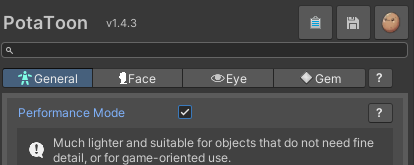
1. Performance Mode
- Added
Performance Mode, a lightweight mode based on the new Simple Shader. - It helps you set up materials faster when they do not need complex features, such as NPCs or background objects.
- Advanced settings and pass settings can still be adjusted, and pass settings are preserved when switching Performance Mode.
2. Alpha Mask
- Added

Alpha Mask. - The previous
Clipping Maskhas been changed toClipping Modeand is now available in the Alpha Mask settings. - Except for Clipping, Alpha Mask works the same way as lilToon’s feature. The conversion utility also supports automatic conversion.
- Eye materials now support Alpha Mask as well, making it easier to mask only specific areas.
3. Added Character Mask Pass control
- Added a Character Mask Pass toggle to the Gem shader, so you can directly control whether the character mask pass is used when needed.
Optimizations
1. Build time optimization
- Improved how Opaque Dither Fade passes are handled in the default build. (-25%)
- Unused Opaque Dither Fade passes are now removed by default, reducing project build time by 50%.
2. Shader optimization
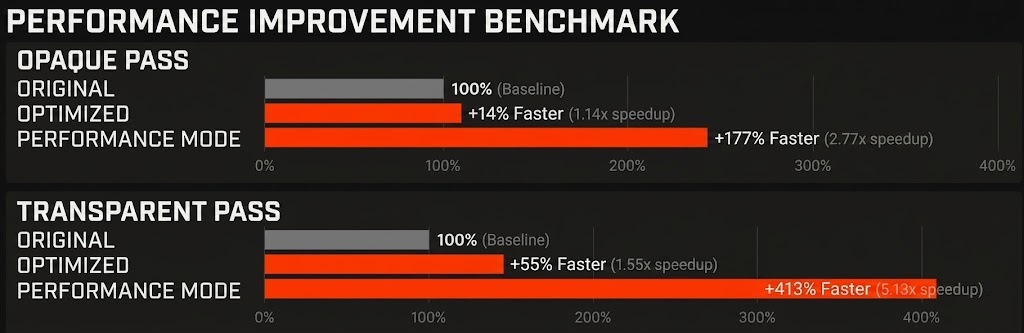
- Performance Mode is about 2.7x to 5.1x faster.
- The default shader also received runtime performance improvements.
Bug Fixes
1. Gem Shader fixes
- Fixed an issue where Gem Refraction could look unstable in certain situations.
2. 2D Face Shadow fixes
- Fixed an issue where noisy line artifacts could appear when using 2D Face Shadow.
3. Eye Shader GUI fixes
- Fixed issues where some settings in the Eye Shader inspector were displayed awkwardly or did not behave correctly.
4. Shader warning cleanup
- Cleaned up warnings from multiple shaders.
Last updated on